
Talk to your footage.
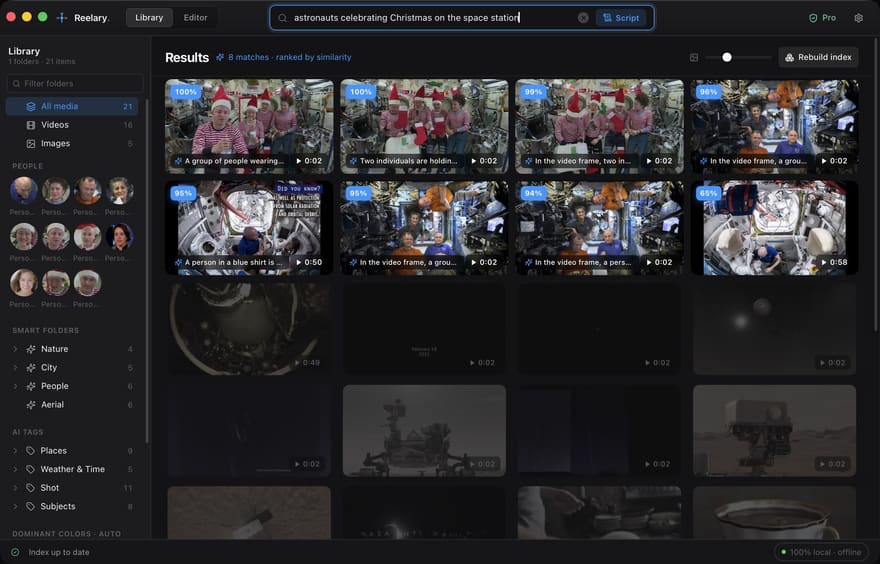
Describe the shot, get the shot. Describe the film, get the cut. Reelary searches every frame of your library by meaning and exports a finished MP4 - no second app, no cloud, no subscription.
For editors, YouTubers and wedding filmmakers with more footage than they can remember.
- 99 s
- to make 14.5 minutes of 1080p video searchable on an M5 Pro MacBook Pro
- Every 2 s
- of video is its own searchable moment, so results come with start and end times
- 100,000
- files in one library, tested. Free indexing has no file limit
- 0
- uploads, accounts or analytics. Unplug the network and it keeps working
From a sentence to a delivered file.
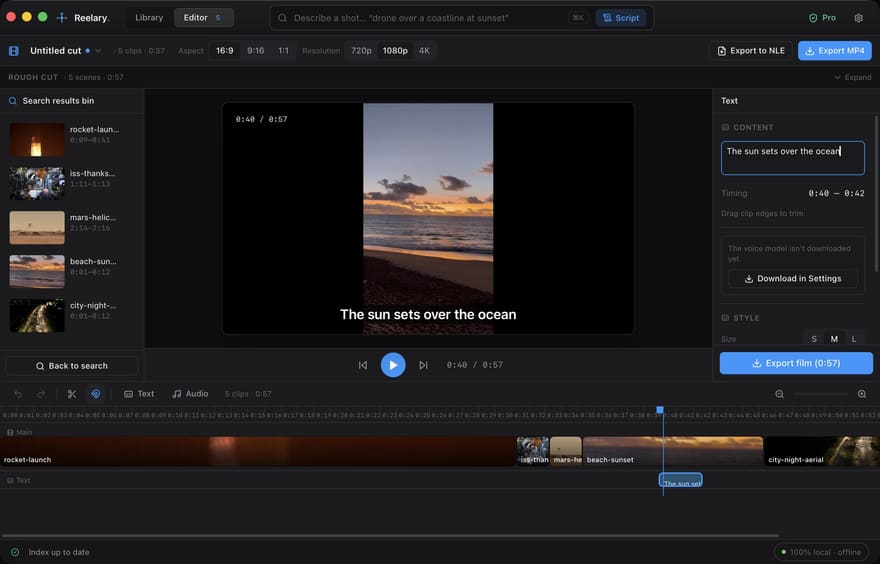
Describe the film you want. Reelary lines up matching shots on a script-driven timeline you can trim, reorder and caption, then exports MP4 with a local AI voice-over track. Every other local search tool stops at the list of clips and sends you to Premiere.
Prefer to finish elsewhere? Export FCPXML / EDL and hand off to Premiere, Final Cut or Resolve - the project references your original files on disk.
Voice-over and voice cloning use Resemble AI's Chatterbox text-to-speech model, run on your machine. See every AI model Reelary uses.
Reframe for every platform.
Auto-reframe follows the subject to crop 16:9, 9:16 and 1:1, so one cut ships to every destination.

Search what was written, said, who was there, and where.
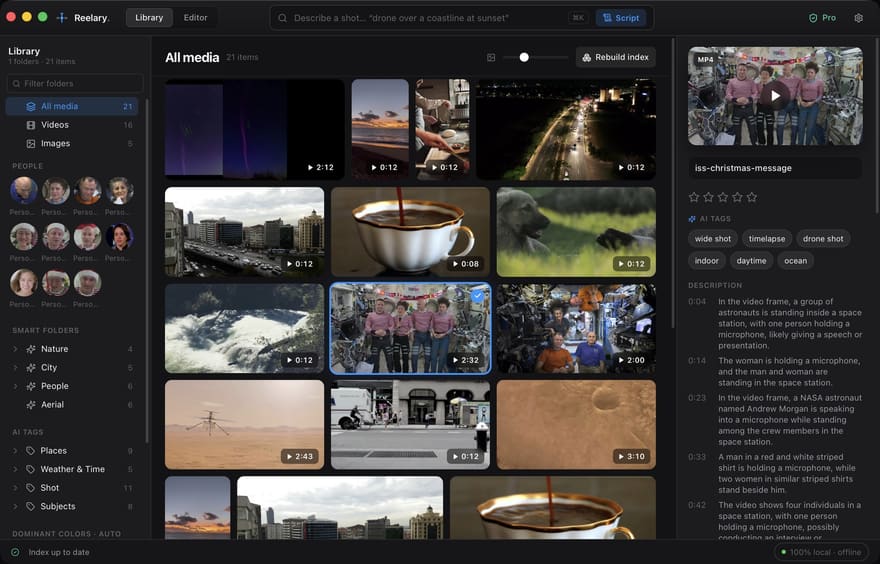
Every shot gets a written description from a local vision-language model, so you can read a clip before you play it, and the text in every frame is read too: search "for sale" and the shot of the sign comes up (new, free). Pro also transcribes the dialogue and groups faces into people - name someone once and every shot they appear in is one click away. GPS from phones, DJI drones and GoPros puts every file on a map, and a city name becomes a search term.
Let everyone find their own shot.
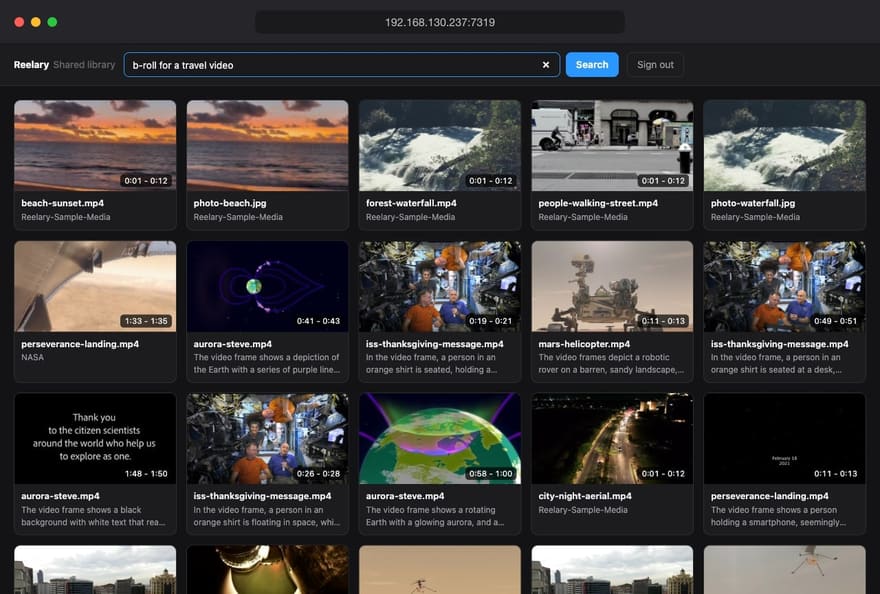
Turn on LAN sharing and anyone on your network can search your library from a browser - laptop, tablet or phone, no install. They preview the matching moment and download just that clip or the original file. Read-only, behind an access code, and it never leaves your network.
Ask Claude to find the shot.
Reelary works as an MCP server and a set of agent skills, so Claude Code, Claude Desktop, Cursor and Codex can search your library, build a rough cut from a script and export an MP4 or a Resolve timeline. The app does the work on your machine in the background; the agent never touches the video.
One command installs and connects everything. How it works · a rough cut with Claude Code
$ npx reelary
✓ Reelary running in the background
✓ Connected to Claude Code, Claude Desktop, Cursor, Codex
✓ Skills installed

> Find drone shots of the coast at sunset
  reelary_search · 8 matches
  DJI_0412.MP4   00:14-00:20
  DJI_0398.MP4   01:02-01:08

> Cut a 30s 9:16 recap, export for Resolve
  reelary_rough_cut · 6 scenes
  reelary_export_nle · lisbon.fcpxml
Every frame searchable. Nothing leaves your machine.
Search by meaning
A local vision model embeds every frame and every 2-second clip, describes each shot in a sentence and reads the text on signs, titles and labels. Pro adds what was said, who is on screen and where it was shot. Skip the tagging, the folder names and the scrubbing.
No second app needed
Search, assemble, caption and export a finished MP4 in one place. Other local search tools hand you a list of clips and stop there.
Yours, offline, forever
Models, index and video never leave your machine - it works with the network unplugged. One payment, no subscription.
Comparing options? Reelary vs Scenelet, vs Wideframe, vs Jumper, or a local alternative to Eddie AI.
Questions before you download
Who is Reelary for?
Anyone sitting on more footage than they can remember: video editors and YouTubers reusing b-roll, wedding and event filmmakers digging through past shoots, documentary and corporate teams with years of interviews, and families with a decade of phone videos. If you have ever scrubbed through an hour of clips looking for one shot, it is for you.
How long does indexing take?
On an M5 Pro MacBook Pro, 14.5 minutes of 1080p video was searchable in 99 seconds, about 7 minutes per hour of footage. Slower machines take longer, but search is never blocked: files become searchable as they finish, and Reelary keeps working in the background. Scene descriptions, on-screen text, and (with Pro) dialogue and faces are added in a second background pass. Indexing is incremental: after the first pass, only new or changed files are processed, and an interrupted import resumes where it stopped.
How do I get the most accurate search results?
Describe what is visible in the shot, the way you would tell a colleague: "dog running on a beach at sunset" works better than "summer vibes" or a file name. Add the details that set the shot apart, such as the setting, colours, actions or time of day. Words written on signs, titles and labels are matched as text, so search for them directly. To search one project only, select its folder in the sidebar first. Each result covers a run of 2-second moments, so you get the part of the video that matches, with its start and end time, not just the file.
Does Reelary upload my footage?
No. The AI models run on your own computer and the index is a folder on your disk. No frames, thumbnails, transcripts or file names are sent anywhere, and there is no account to create.
What is free, and what does Pro add?
Indexing and visual search are free and unlimited, along with scene descriptions, on-screen text search and making a film from a sentence (exports capped at 720p with a light watermark, up to 60s). Pro adds full-resolution exports with no watermark, dialogue search, people, places, LAN sharing and export to Premiere, Final Cut and Resolve.
More answers on formats, hardware, seats and refunds in the full FAQ.
Free to start. Buy once to own it.
Index your whole library and cut your first film for free.
Free
- ✓ Unlimited libraries, frames & indexing
- ✓ Full semantic search & smart folders
- ✓ Search the text on signs, titles & labels
- ✓ Make a film from one sentence
- · Exports capped at 720p with a light watermark, up to 60s
Reelary Pro
- ✓ Dialogue search across your whole library
- ✓ People: find every clip of a person
- ✓ Places: map your footage, search by city or country
- ✓ LAN sharing: your team searches and downloads from a browser
- ✓ Export NLE projects (FCPXML / EDL)
- ✓ No watermark · full resolution (1080p / 4K)
- ✓ Unlimited length & exports
- ✓ Multi-version / multi-aspect batch export
- ✓ Custom voice cloning
- ✓ Commercial use included
- ✓ Buy once - works on Mac & Windows
- ✓ Free lifetime updates
Studio
- ✓ Everything in Pro
- ✓ Activate on 10 machines
- ✓ Priority email support
14-day refund window. On macOS, Pro is a one-time in-app purchase - see Download.
Talk to your footage today.
Free forever to index and search. $79 once to export at full quality.