
Local AI video search
Search every frame of your footage by describing it, with the footage, the model and the index all staying on your own machine. No upload, no account, no monthly fee.
The problem with a library you cannot search
Every editor with more than a few terabytes has the same experience: you remember the shot exactly - the light, the movement, roughly which trip it was from - and you cannot find it. Filenames are camera-generated. Nobody logged the footage, because logging is the job everyone postpones. The NLE's search only matches metadata that was never written.
The usual fix is to upload everything to a service that indexes it for you. That works, and for a large amount of professional footage it is simply not allowed.
How on-device semantic search works
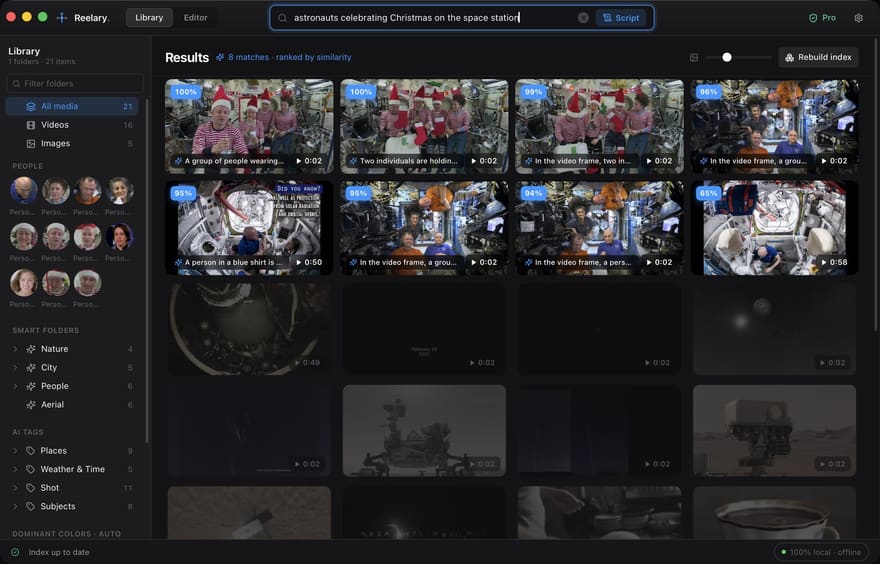
- Sampling. Reelary walks the folders you point it at and samples every image plus one frame every two seconds of video, so a long clip becomes a series of searchable moments rather than one entry.
- Embedding. A vision model turns each sample into a vector - a few hundred numbers describing what is visually in that frame. The model runs locally, sized automatically to your hardware.
- Indexing. Vectors go into a local vector database on your disk. Nothing is transmitted; the index is a folder you can back up or delete.
- Querying. Your sentence is embedded by the same model and compared against the index. Because a video is indexed as many moments, a result is a range of consecutive clips - the usable piece of the shot, not just the file it lives in.
What you can ask for
- Content: "a warm sunset over the landscape", "someone laughing at a table outdoors".
- Framing and movement: "slow aerial push over water", "tight handheld close-up".
- Look: dominant colour, time of day, indoor or outdoor, weather.
- Combinations of the above, refined until the shortlist is right.
The same index also drives smart folders, automatic tags and colour filtering, so browsing improves even when you are not searching for anything in particular.
Why "local" is a requirement, not a preference
For a large share of paid video work, uploading the rushes is contractually or practically impossible: client NDAs that name approved processors, corporate footage that cannot leave the internal network, medical or legal material, weddings and events full of people who consented to being filmed rather than to a vendor storing them. And a single event shoot can outweigh a day of upload time anyway.
A tool that indexes locally is usable in all of those situations without asking anyone for permission. That is the whole design constraint behind Reelary. See how it compares with the cloud-based option, or with other local search tools.
From finding the shot to shipping the cut
Search is half the job. Once the shots are found, Reelary lays them out on a script-driven timeline - one segment per line of your script - which you can reorder, trim and caption, then export as an MP4, or as FCPXML / EDL for Premiere, Final Cut or Resolve. Most local search tools stop before this step.
Common questions
Does local AI video search work without an internet connection?
Yes. Reelary downloads a vision model once during setup, then runs entirely offline. Indexing, search, timeline assembly and export all work with the network disconnected.
Is any footage uploaded for indexing?
No. The model runs on your own CPU or GPU and the resulting vectors are written to a local database on your disk. No frames, no thumbnails and no transcripts are sent anywhere.
How is this different from searching filenames or tags?
Filename search only finds what somebody already typed. Semantic search compares the meaning of your query against the visual content of every frame, so "a warm sunset over the landscape" finds the shot even if the file is called C0042.MP4.
More in the full FAQ.
Free forever for unlimited libraries, unlimited indexing and full semantic search - no account and no card. Exports capped at 720p with a light watermark, up to 60s on the free tier; a one-time Pro license removes that.